Introduction
Use the Kid Connect app on your smartphone to send messages to your child's InnoTab® 3S.
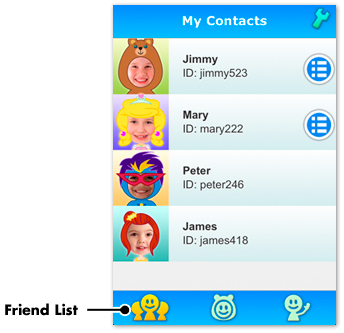
When you open the app, the first thing you'll see is your contacts list. Tap on a contact to send a message or to view messages that have been sent to you.
You can send different types of messages by tapping the icons at the bottom of the message window.
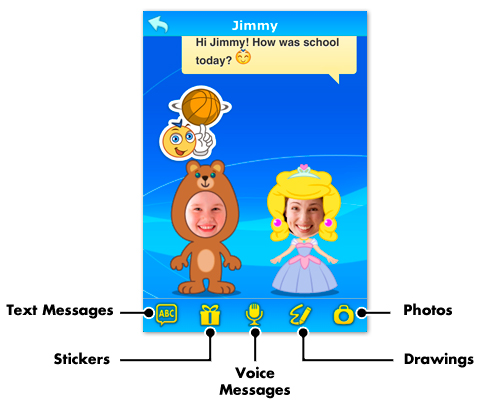
Note: Voice messages, photos, drawings, and some animated stickers can only be sent to children who have the Premium version of the VTech Kid Connect app installed on their InnoTab® tablets. The Kid Connect Premium version is sold separately on Learning Lodge™. If you are interested in upgrading Kid Connect to the Premium version, please visit Learning Lodge™ for more details.
Text Messages
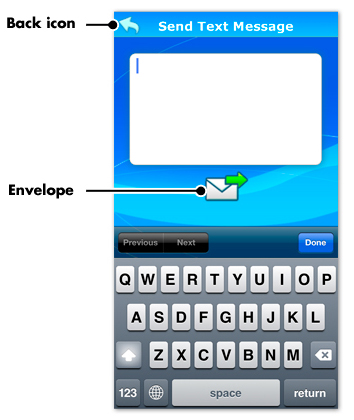
Use the keyboard to enter a text message; then, touch the envelope  to send it.
If you want to go back to the message window, tap the back icon  in the top left corner.
Stickers
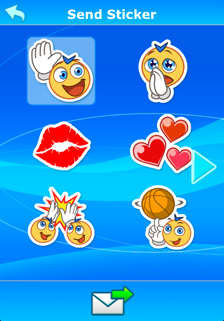
Touch a sticker to select it; then, touch the envelope  to send it.
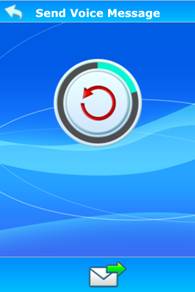
Voice Messages
- Touch the recording button
 to start recording. You can record a voice message up to 10 seconds long.
 - Touch the stop button
 to stop the recording
 - What you recorded will play back automatically. If you're satisfied with your recording, touch the envelope
 to send it, or touch the re-record button
  to record something else.
Drawings
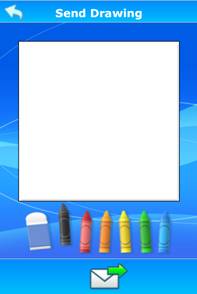
Choose one of six colors to draw on the canvas, or choose the eraser if you make a mistake. When you're done, touch the envelope
to send your drawing.
Photos
- Touch the camera icon
 to take a new photo; or touch the album icon
  to choose a photo from your album.
 - The app will show the photo you have taken or selected.
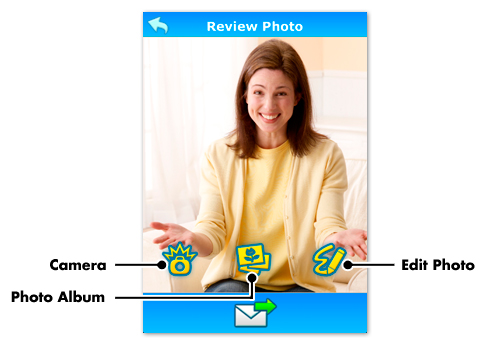
- Touch the camera icon to take a new photo;
- Touch the photo album icon to choose a different photo;
- Touch the edit photo icon
 to edit the photo. This takes you to the Drawing page where you can decorate your photo.
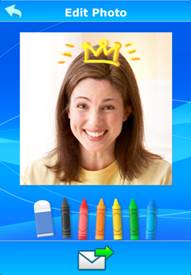
When you're done, touch the envelope
to send the photo.